165
Tool Creation |Human Agents
164
Tool Creation |Human Agents
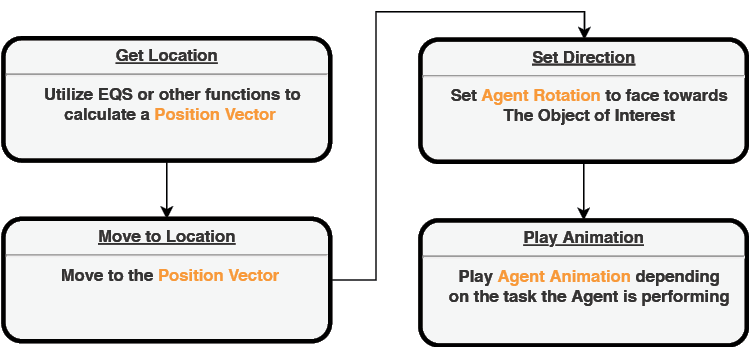
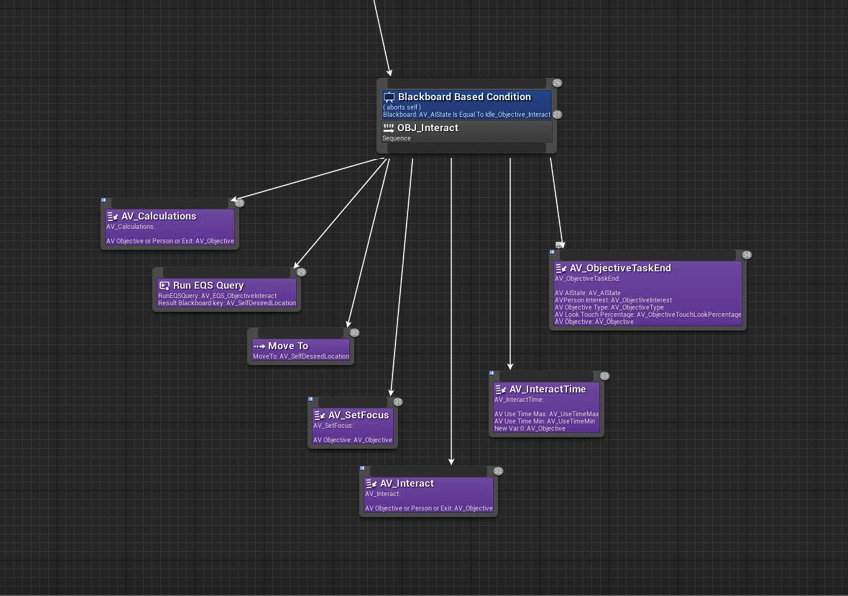
In order to do this, we need to first consider some basic parameters that can describe both the most common forms of object interactivity, as well as the most influential forms on crowd movement. With this in mind, we can logically break down these parameters into the ability to touch, the ability to sit, and the need for queuing (lining up). The ability to touch would be the default form of interaction, as this can be modified to be any other form of interaction (such as typing, taking, painting, pushing, etc.) by changing its animation and looping timeframe. The ability to sit is perhaps the most common form of interaction amongst varying spatial typologies. Since rest is such an important human need, the presence of chairs can usually be found no matter what type of space is being designed. The need for queuing comes into play when there is overdemand on a specific object. This can be seen in scenarios such as checking tickets at entrances, ordering food at counters, talking with bank tellers, etc. While this won’t be relevant in every space typology, it is common enough in public spaces to warrant its consideration. Translating these into the behavior tree, we can utilize the following steps: (Fig. 3.3.22 - 24)
Check to see if the object can be sat upon, or if there is a lineup required.
Define location based on object type.
If the object cannot be sat upon, and does not have a lineup, Utilize EQS to define a location around the object.
If the object functions as a seat, define the location in front of the seat.
If there is a lineup, define the location at the end of the lineup.
Walk to location.
Set rotation direction of the agent based on object type.
If the object cannot be sat upon, and does not have a lineup, turn towards the object.
If the object functions as a seat, align the agent body to the seat.
If there is a lineup, turn towards the start of line.
Perform animation based on object type.
If the object cannot be sat upon, and does not have a lineup, play touch animation
If the object functions as a seat, play sitting animation
If there is a lineup, play waiting animation. The agent might also need to continuously update its position as the line moves forward.
Wait for randomized time interval based on object type.
Object-Interact State tasks within behavior tree
Screen-captured by Author.
Simplified steps for establishing object Interaction tasks
Illustrated by Author.